Skip navigation

Visit healthcare professional website

Arrow-Upward 

Home
    • CGM
        • Accu-Chek SmartGuide CGM solution
        • CGM Learning Centre
        • CGM Support
    • Products View all
        • Continuous Glucose Monitoring View all
            • Accu-Chek SmartGuide CGM solution
        • Blood Glucose Monitoring View all
            • Meters View all
                • Accu-Chek Instant
            • Test Strips View all
                • Accu-Chek Instant test strips
                • Accu-Chek Aviva test strips
                • Accu-Chek Guide test strips
                • Accu-Chek Performa test strips
                • Accu-Chek Mobile test cassettes
            • Lancing View all
                • Accu-Chek FastClix
                • Accu-Chek FastClix lancets
        • Apps & Software View all
            • mySugr® app
    • Blog View all
        • Diabetes Basics
        • Diabetes Management
        • Lifestyle
        • Food & Nutrition
        • Recipes
    • Training & Support View all
        • CGM Learning Centre View all
            • CGM Learning Center Library
            • Getting Started View all
                • What’s included with your Accu-Chek SmartGuide CGM solution
                • Download and set up the mySugr app
                • Apply the Accu-Chek SmartGuide sensor
                • Pair the Accu-Chek SmartGuide sensor and app
                • Calibrate the Accu-Chek SmartGuide sensor
                • Remove and dispose of the sensor
            • How to use the mySugr app View all
                • Explore the mySugr app
                • Explore predictions with the mySugr app
                • Trend arrows and colours
                • How to use graphs and statistics in the mySugr app
                • How to use alarms and reminders in the mySugr app
                • How the Glucose Patterns Feature works in mySugr Glucose Insights
            • CGM Basics View all
                • CGM vs. BGM: Understanding the difference
                • What is MARD?
                • Lag time in Continuous Glucose Monitoring (CGM)
                • Wearing your SmartGuide sensor
                • Data Sharing with the mySugr app
                • Understanding the Ambulatory Glucose Profile (AGP)
        • General FAQs View all
            • General Questions
            • Getting Started
            • Test Strips
            • Device Settings
            • Accuracy
            • Connecting to mySugr
            • Power
        • Product Support View all
            • Continuous Glucose Monitoring View all
                • Accu-Chek SmartGuide CGM solution
            • Meters and Strips View all
                • Accu-Chek Instant
                • Accu-Chek Guide Link
                • Accu-Chek Active
                • Accu-Chek Aviva
                • Accu-Chek Aviva Expert
                • Accu-Chek Performa
                • Accu-Chek Performa Nano
                • Accu-Chek Mobile
            • Lancing View all
                • Accu-Chek FastClix
            • Apps & Software View all
                • Data sharing using the mySugr app
        • Tools & Resources View all
            • Meaningful Blood Glucose Monitoring
            • HbA1C Calculator
            • Paired Testing
            • Accu-Chek 360° View tool
            • Accu-Chek Weekly Diaries
    • Meter Registration
    • Shop
        • Blood Glucose Monitoring
            • Where to buy
  • Visit healthcare professional website

    Arrow-Upward 

  • CGM
    • Accu-Chek SmartGuide CGM solution
    • CGM Learning Centre
    • CGM Support
  • Products
    • Continuous Glucose Monitoring
      • Accu-Chek SmartGuide CGM solution
    • Blood Glucose Monitoring
      • Meters
        • Accu-Chek Instant
      • Test Strips
        • Accu-Chek Instant test strips
        • Accu-Chek Aviva test strips
        • Accu-Chek Guide test strips
        • Accu-Chek Performa test strips
        • Accu-Chek Mobile test cassettes
      • Lancing
        • Accu-Chek FastClix
        • Accu-Chek FastClix lancets
    • Apps & Software
      • mySugr® app
  • Blog
    • Diabetes Basics
    • Diabetes Management
    • Lifestyle
    • Food & Nutrition
    • Recipes
  • Training & Support
    • CGM Learning Centre
      • CGM Learning Center Library
      • Getting Started
        • What’s included with your Accu-Chek SmartGuide CGM solution
        • Download and set up the mySugr app
        • Apply the Accu-Chek SmartGuide sensor
        • Pair the Accu-Chek SmartGuide sensor and app
        • Calibrate the Accu-Chek SmartGuide sensor
        • Remove and dispose of the sensor
      • How to use the mySugr app
        • Explore the mySugr app
        • Explore predictions with the mySugr app
        • Trend arrows and colours
        • How to use graphs and statistics in the mySugr app
        • How to use alarms and reminders in the mySugr app
        • How the Glucose Patterns Feature works in mySugr Glucose Insights
      • CGM Basics
        • CGM vs. BGM: Understanding the difference
        • What is MARD?
        • Lag time in Continuous Glucose Monitoring (CGM)
        • Wearing your SmartGuide sensor
        • Data Sharing with the mySugr app
        • Understanding the Ambulatory Glucose Profile (AGP)
    • General FAQs
      • General Questions
      • Getting Started
      • Test Strips
      • Device Settings
      • Accuracy
      • Connecting to mySugr
      • Power
    • Product Support
      • Continuous Glucose Monitoring
        • Accu-Chek SmartGuide CGM solution
      • Meters and Strips
        • Accu-Chek Instant
        • Accu-Chek Guide Link
        • Accu-Chek Active
        • Accu-Chek Aviva
        • Accu-Chek Aviva Expert
        • Accu-Chek Performa
        • Accu-Chek Performa Nano
        • Accu-Chek Mobile
      • Lancing
        • Accu-Chek FastClix
      • Apps & Software
        • Data sharing using the mySugr app
    • Tools & Resources
      • Meaningful Blood Glucose Monitoring
      • HbA1C Calculator
      • Paired Testing
      • Accu-Chek 360° View tool
      • Accu-Chek Weekly Diaries
  • Meter Registration
  • Shop
    • Blood Glucose Monitoring
      • Where to buy
Home

Breadcrumb

  1. Home
  2. E 9 Batteries Drained Replace Batteries
  1. Home
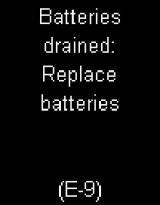
E-9 Batteries drained: replace batteries

Accu-Chek Mobile

Error codes E-9 Batteries drained: replace batteries

Batteries drained: replace batteries - Insert new batteries.

E-8 Temperature too high: retest in a cooler location

E-8 can mean a number of things, depending on the instructions…

E-8 Temperature too low: retest in a warmer location

E-8 can mean a number of things, depending on the instructions…

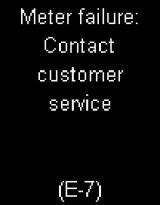
E-7 Meter failure: contact customer service

Meter failure: contact customer service.

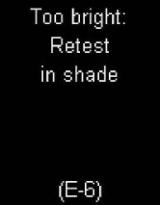
E-6 Too bright: retest in shade

E-6 can mean a number of things, depending on the instructions…

E-6 Drop applied too early: retest

E-6 can mean a number of things, depending on the instructions…

E-5 Handling error
E-5 Handling error

Handling error.

Cassette dirty: Clean per user’s manual
E-4 Cassette dirty

E-4 can mean one of two things depending on the instructions…

E-4 Blood applied incorrectly

E-4 can mean one of two things depending on the instructions…

E-3 Meter error - Retest

A meter error has occurred or the meter is defective.

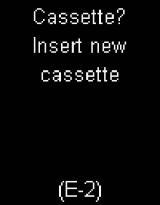
E-2 Cassette? Insert new cassette

There is no cassette in the meter.

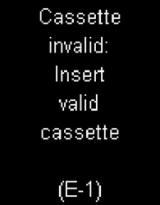
E-1 ​Cassette invalid: insert valid cassette

E-1 can mean a number of things, depending on the instructions…

E-1 Cassette expired: insert new cassette

E-1 can mean a number of things, depending on the instructions…

E-1 Cassette empty: insert new cassette

E-1 can mean a number of things, depending on the instructions…

E-1 Cassette defective: insert new cassette

E-1 can mean a number of things, depending on the instructions…

Product Support

Video

Support videos

Downloads

Downloads & Guides

FAQs

FAQs

roche_logo
UNITED KINGDOM
Other Roche Websites
  • Healthcare Professional website
  • Roche UK
  • Roche Ireland
  • Roche Global
  • All locations
Useful Links
  • About Us
  • Contact Us
  • Website Terms & Conditions
  • Privacy Notice
  • Cookie Policy
  • Cookie settings
  • Safety Notices
UNITED KINGDOM

The persons shown in photographs are models for illustrative purposes only and are not real life patients.

This website contains information on products which are targeted to a wide range of audiences and could contain product details or information otherwise not accessible or valid in your country. Please be aware that we do not take any responsibility for accessing such information which may not comply with any valid legal process, regulation, registration or usage in the country of your origin. 

ACCU-CHEK, MYSUGR and related marks are trademarks of Roche. The Bluetooth® word mark and logos are registered trademarks owned by Bluetooth SIG, Inc. All other product names and trademarks are property of their respective owners.

© 2026 Roche Diagnostics Limited. All rights reserved.